Making of Tree Clipper

TL;DR: Tree Clipper is an Add-on and library for exporting and importing Blender’s node trees as JSON.
Algebraic made its debut on the official extension platform! 🎉🎉🎉
Squishy Volumes’ development has been on hold for the last couple of months in favor of Tree Clipper. I am very proud to say that Tree Clipper is now ready for use and has been accepted on the official extension platform as well. Big thanks to the contributors, especially Brady Johnston and Jan-Hendrik Müller!
This blog entry provides motivation and an overview of the features, but is mostly about the technical challenges we faced while making Tree Clipper.
Check out the sharing website Jan-Hendrik Müller made!
Motivation
Blender’s node trees are arguably a visual scripting language. Yet, the usual software development tools and workflows do not apply as it’s a graph-based language rather than a text-based one. You can see where I’m going here: Tree Clipper changes that.
And JSON is a handy text-based format because many tools in many languages support it. If only it had trailing commas.
(╯°□°)╯︵ ┻━┻
From my perspective, a software developer’s perspective, this is already ample motivation. But wait, there’s more: It’s actually really easy to go from JSON to a compressed (Base64) string and back! This provides a convenient way to share that is useful for any Blender node tree user. (Not only add-on devs)
Shoutout to Brady Johnston for this idea!
If you have ever played Factorio with any vigor, you have also encountered its Blueprints and maybe also one of the unofficial sharing websites, like Factorio Prints. Basically, Blueprints are also compressed strings that enable players to copy and share designs via the system clipboard. Need a 3-7 belt balancer? Just copy from the browser & paste in-game without losing a beat.
So that is another angle to look at Tree Clipper: it enables us to do a similar thing with Blender’s node trees. Imagine the speed with which we could exchange ideas, teach, and debug. Not to mention that we can analyze and search JSON with lean tools without depending on the Blender executable.
The potential is exciting!
Why Not Use <..>?
Yes! Depending on what we want, there are better solutions.
For example, binary .blend files might be better suited. Especially, if we’re also interested in exporting/importing meshes or other large data. Node trees can be loaded from a .blend file into another project. And there’s the Asset Browser, which offers a nice set of workflows. These can also leverage Blender’s own compatibility system. Nice!
Given that we’re interested in a text format, we’re out of luck when it comes to official support. There is no official JSON (or any text-based) export/import of nodes, and a relatively recent PR for this was rejected.
However, there are a few add-ons that are similar to Tree Clipper. Let me refer to the Related Work section of the README on GitHub.
Features
Alright! Tree Clipper’s purpose is to export and import nodes as JSON. It does that. Trees, subtrees, interfaces, nodes, links, sockets, the whole shebang.
Basic Workflow
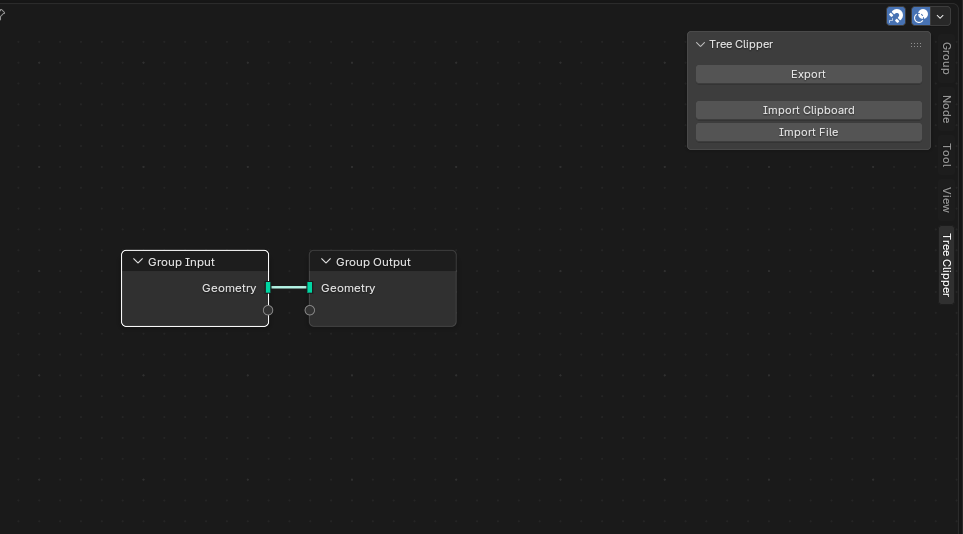
We get a panel in the (geometry/material/compositor/texture) node editor that looks like this:
Exporting
This is the basic pop-up for exporting (the current tree and subtrees are exported):
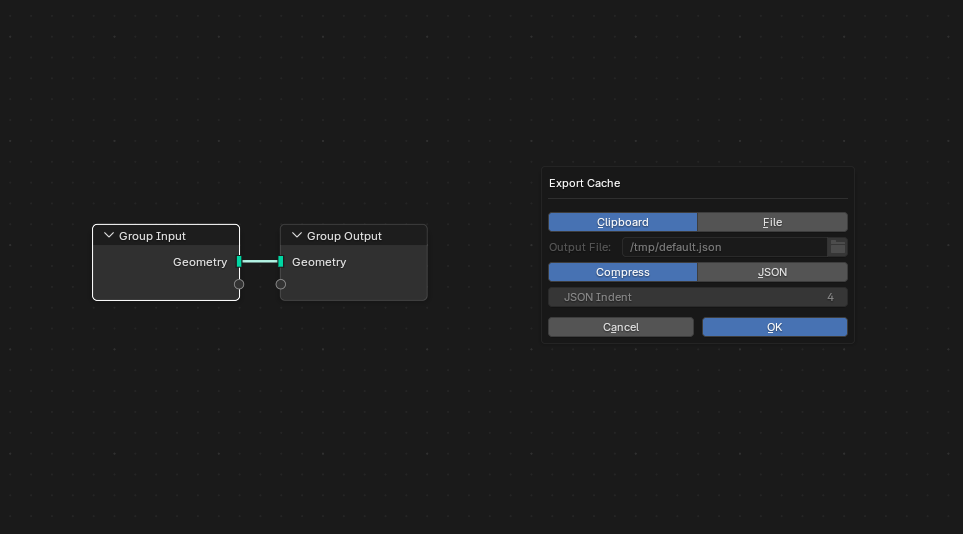
We make two choices here.
- Either save directly into the Clipboard or to a File on disk. This is needed because (very) large setups do not fit into the system clipboard.
- For sharing, the Compressed Base64 string is more convenient, but plain JSON is preferable for add-on development.
Here are two export examples:
Compressed:
TreeClipper::H4sIAAQhjmkC/+1XbW/iOBD+K1U+rxDZAi33rarQCh0Lqy2ctFpVlnGG4KtjW7YD7VX89xs7CTg0x+2edLrVafuBwrw4M8/MM568JmsBMgNDdmAsVzL55SoZ9vq9NHl3lTgDQJjgWrcNUN0begOpMiDeyqL462vCM/zfR0VGHcWvr4mkBXiXD6AKcOblao4u1vuWFsiGPgHBLwZNNlRYqOXw7AxtFM6UXs4tMaV0vABSn954OJpHv5gSypBKlswX84l/WAYbWgpHcqNKTULYe565LdqkgxAwWGa4dnWG3mctfAS1C5cOzIYyiAKKRHXqaZw6ZY7vAD0zeK513EFhA2Ann/exTzCIsLy+hGXSHbdV7AkccS86WHvAH4Io9ttyhGBHRQkRdEHIJSlUxje8VZWNMgwQOElQIbJIg3Xh0mpgjqjS6dK1dZpKEMSpPBfxowR9wZ6yINCPd5xagCyxDdA7g1iuQqpUEEHXICIFdc7wdemwO1RBeUDj02I6X8blPxk1WAbAsKDMlQaOmN2tlovYj8sqr+S3u9kqNBSipCrRYrX8tApP8cU7HvGwuP91skwOh3dNoQc/a/mj13I6v1jKx8PB1zOMPXti8PAt6/HrqOF7ROdRbCkUo3Wtv47f93s4hm7x89EjWqsIXVslMMcOm2h+eXGyBZ5vfRZpvxIcW8wPsKtpSDtUqwI7wLWnRnKZE22UpnkTTnI3mzUjmpXWqYKEqXo+ZX1U/d6ofzPGv9v+YDAe3YwQjW+T+SSqponOtVu1J1Vj2NOoDVJtYMdhf9bjcZ9VQLWOcniVYDfEfeyBiKp30zl/H0OhKxJExreXhvX4HxD8LAWQFC/k7JS54PKJCF5wD9KgPx42iXXwqXMOaOzunP9RqPjCrBv7w2TxcbL8/CXExq1GIhO7pZVyNsWrMxpfaee9/iOmdb96WC4+diZ1P/18P5tUVK6ueJ41qfjhGrhypIqmBqSPUJZCxFCkf8VjJOPfE/nc6DuZvKgm808qv6FyenGXSq//bX6m/x05B/8/cr4ZvunwwqjupvKJKy0uV+tMvaAfNx2ffudkaHrEH7v0y7vfUaRUrmFZfaYHLo53dLEd2xeP9SjyrPW+41kQg70xSN9qJayvG6dOv9PrJnh0dUqJ9vIWLYLRE/ybkFr/3mZuo4CMd4ktK4XuUmjc1c7kvuykALvtELPS7KBDrhUew4Qqs7PXwj3ljuD26t9J2VOHZ26Aop0Gybg4nx8NAKSgkuZQbbOnsnsmPOMbHS6kviIeR8tAVove4fAn7fQnsCoPAAA=
JSON:
{ "blender_version": "5.0.1", "tree_clipper_version": "0.1.5", "node_trees": [ { "id": 0, "data": { "name": "Geometry Nodes", "use_fake_user": false, "use_extra_user": true, "is_runtime_data": false, "tag": false, "color_tag": "NONE", "default_group_node_width": 140, "description": "", "bl_use_group_interface": true, "interface": { "id": 1, "data": { "active_index": 1, "items_tree": { "id": 2, "data": { "items": [ { "id": 3, "data": { "name": "Geometry", "description": "", "socket_type": "NodeSocketGeometry", "hide_value": false, "hide_in_modifier": false, "force_non_field": false, "is_inspect_output": false, "is_panel_toggle": false, "layer_selection_field": false, "menu_expanded": false, "optional_label": false, "attribute_domain": "POINT", "default_attribute_name": "", "structure_type": "AUTO", "default_input": "VALUE", "in_out": "OUTPUT", "item_type": "SOCKET" } }, { "id": 4, "data": { "name": "Geometry", "description": "", "socket_type": "NodeSocketGeometry", "hide_value": false, "hide_in_modifier": false, "force_non_field": false, "is_inspect_output": false, "is_panel_toggle": false, "layer_selection_field": false, "menu_expanded": false, "optional_label": false, "attribute_domain": "POINT", "default_attribute_name": "", "structure_type": "AUTO", "default_input": "VALUE", "in_out": "INPUT", "item_type": "SOCKET" } } ] } } } }, "nodes": { "id": 5, "data": { "active": 6, "items": [ { "id": 6, "data": { "location": [ 920.0, 80.0 ], "location_absolute": [ 920.0, 80.0 ], "width": 140.0, "height": 100.0, "name": "Group Input", "label": "", "warning_propagation": "ALL", "use_custom_color": false, "color": [ 0.6079999804496765, 0.6079999804496765, 0.6079999804496765 ], "select": false, "show_options": true, "show_preview": false, "hide": false, "mute": false, "show_texture": false, "inputs": { "id": 7, "data": { "items": [] } }, "outputs": { "id": 8, "data": { "items": [ { "id": 9, "data": { "name": "Geometry", "description": "", "hide": false, "enabled": true, "link_limit": 4095, "show_expanded": false, "hide_value": false, "pin_gizmo": false, "type": "GEOMETRY", "display_shape": "LINE" } }, { "id": 10, "data": { "name": "", "description": "", "hide": false, "enabled": true, "link_limit": 4095, "show_expanded": false, "hide_value": false, "pin_gizmo": false, "type": "CUSTOM", "display_shape": "CIRCLE" } } ] } }, "bl_idname": "NodeGroupInput", "parent": null } }, { "id": 11, "data": { "location": [ 1400.0, 80.0 ], "location_absolute": [ 1400.0, 80.0 ], "width": 140.0, "height": 100.0, "name": "Group Output", "label": "", "warning_propagation": "ALL", "use_custom_color": false, "color": [ 0.6079999804496765, 0.6079999804496765, 0.6079999804496765 ], "select": false, "show_options": true, "show_preview": false, "hide": false, "mute": false, "show_texture": false, "inputs": { "id": 12, "data": { "items": [ { "id": 13, "data": { "name": "Geometry", "description": "", "hide": false, "enabled": true, "link_limit": 1, "show_expanded": false, "hide_value": false, "pin_gizmo": false, "type": "GEOMETRY", "display_shape": "LINE" } }, { "id": 14, "data": { "name": "", "description": "", "hide": false, "enabled": true, "link_limit": 4095, "show_expanded": false, "hide_value": false, "pin_gizmo": false, "type": "CUSTOM", "display_shape": "CIRCLE" } } ] } }, "outputs": { "id": 15, "data": { "items": [] } }, "bl_idname": "NodeGroupOutput", "parent": null, "is_active_output": true } } ] } }, "bl_idname": "GeometryNodeTree", "annotation": null, "links": { "id": 16, "data": { "items": [ { "id": 17, "data": { "is_valid": true, "is_muted": false, "from_socket": 9, "to_socket": 13 } } ] } }, "is_tool": false, "is_modifier": true, "is_mode_object": false, "is_mode_edit": false, "is_mode_sculpt": false, "is_mode_paint": false, "is_type_mesh": false, "is_type_curve": false, "is_type_pointcloud": false, "use_wait_for_click": false, "is_type_grease_pencil": false, "show_modifier_manage_panel": true } } ], "external": {}, "scenes": {} }
Importing
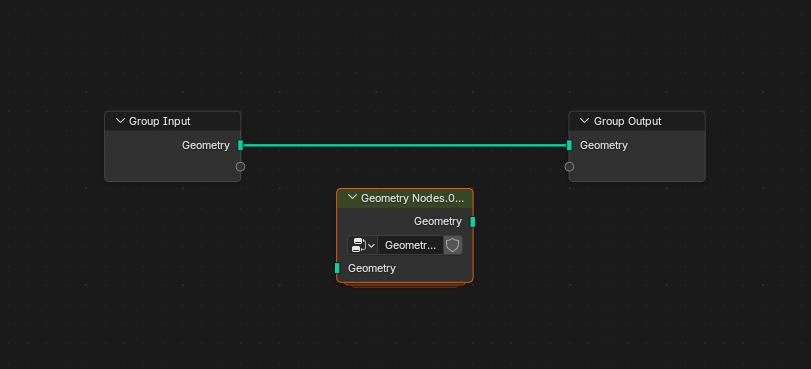
The import adds the tree as a group node by default:
That’s it, byeee ~
External Items
Ok, there’s a good chance that the basic features are plenty enough for us, but what if we reference “external” items like other objects or materials or collections or images or … scenes 😱
There are no external items in the basic example above, but have a look at this one and notice the additional UI in the export pop-up:
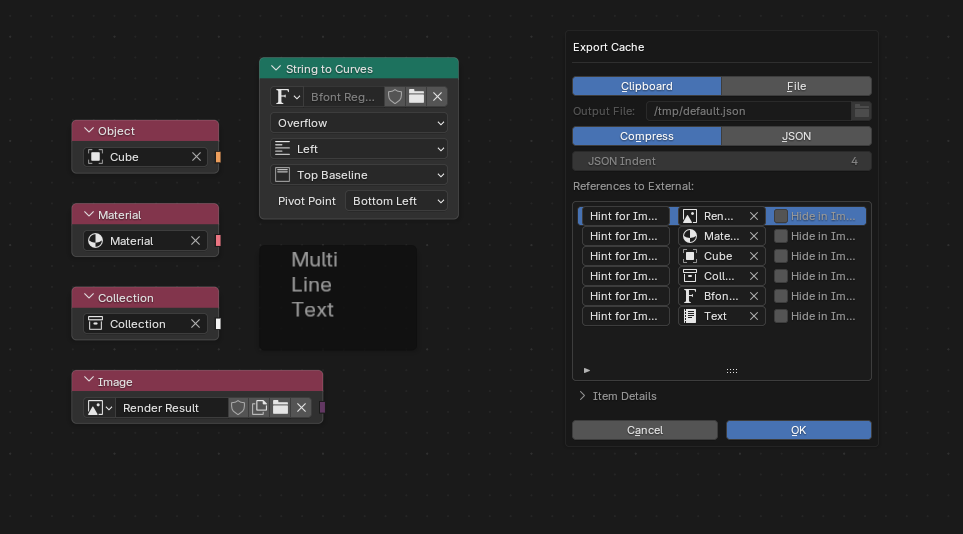
Now, these references to objects, materials, etc., could be vital to the setup’s function! But we’ve drawn our line in the sand; those can’t be in the export. The next best thing we found is to provide the export user with the means to create an import interface of sorts. Meaning, the exporter can provide a “hint” on what the item should be set to on the importing side.
For the importer, it looks like this:
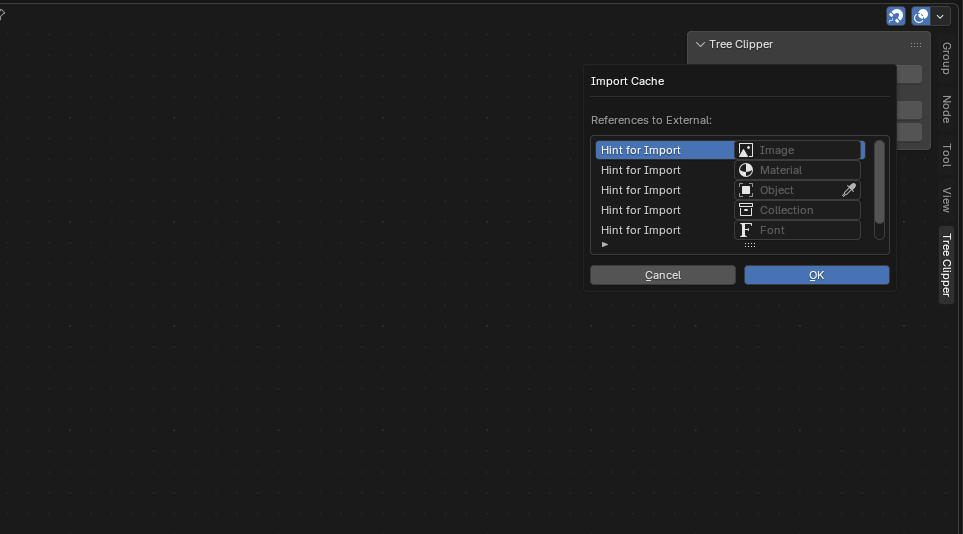
These listed items can then be filled by the already existing objects, images, collections, etc., in the importer’s Blender project before running the actual import.
That’s it for real, bye.
Backwards Compatibility
( ͡° ͜ʖ ͡°)
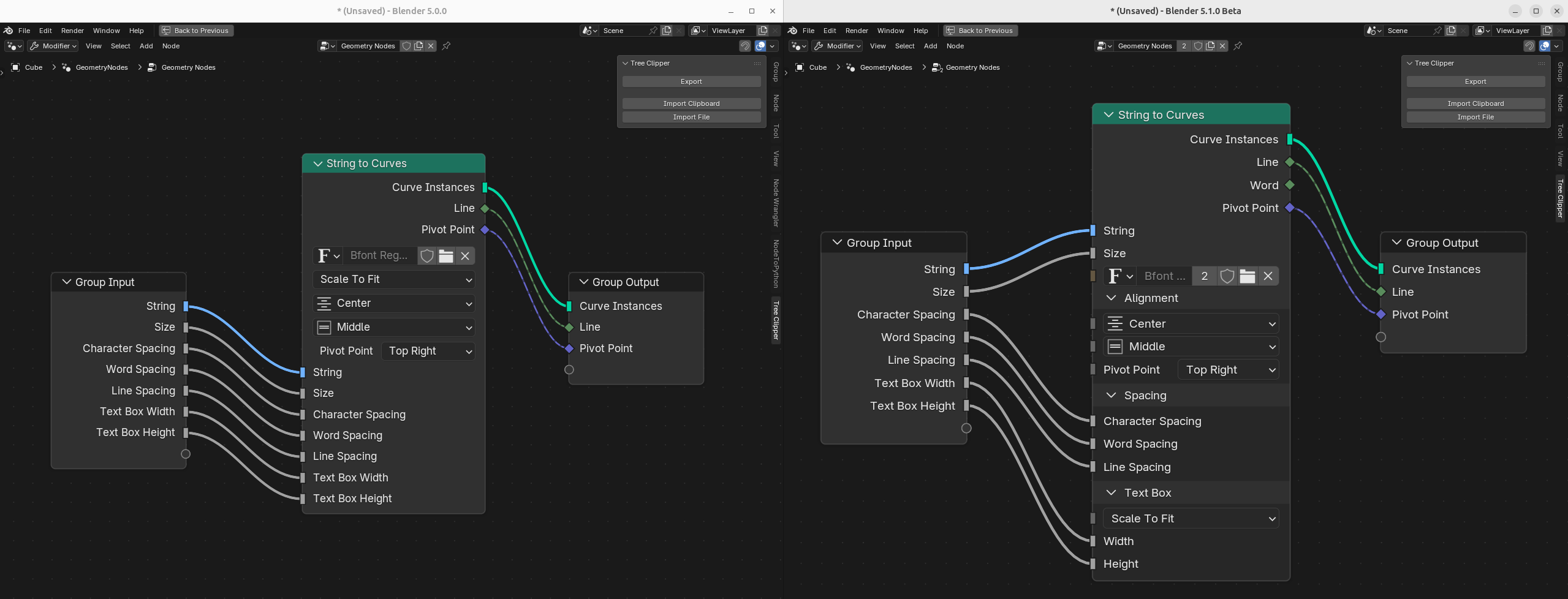
Starting from Blender 5, which is also the minimum version, we have backwards compatibility! Tree Clipper would be much less useful without it.
At the moment, it’s really just getting things from 5.0 to 5.1, but that worked out pretty good. For example, the String to Curves node changed a lot, and Tree Clipper does what you’d expect:
Use in Other Addons
Alright, one more key use case for Tree Clipper.
The tree exports can be shipped with other add-ons, which can then import these setups for their users. This is possible because the core logic is a separate package available on PyPI.
Squishy Volumes does that now.
Other add-ons can also define additional properties on the built-in nodes or define new node types altogether. It’s expected that third-party add-on devs will either overwrite the existing handlers or provide additional handlers for their custom types. More on this in the section on how it works.
If you are an add-on developer and would be interested in using Tree Clipper in that way, HMU! There’s little to no documentation on how to use the core logic, and we’re still figuring out what the API should look like.
That’s about all I wanted to point out feature-wise. Come stick around and see how it works under the hood!
How it Works
How it Works? How it Works.
So, this might be obvious, but we’re limited to the Python API for exporting and importing node trees. The task is to scrape all the information we need to recreate a given node tree And good news: almost all the information we need to recreate is available via the Python API!
And (almost) all (except for scenes 😭), information can be scraped and recreated in the same way.
We’ll glance at exporting, look at the handlers used for exporting and importing, and see that importing is much more involved than exporting.
Exporting
To export, we feed the (root) tree to a recursive function (_export_obj), which takes a Python object and populates its JSON representation with the results of recursive exports of its properties. That’s the basic idea.
The properties are limited to simple data types (bools, ints, floats, strings, and enums, which are also strings), pointers to other Python objects, and collections of Python objects. That might sound like a lot of properties, but it really narrows down what Tree Clipper must be able to handle, and all these properties map nicely to JSON!
Here’s a schematic of what the structure of a tree looks like from the Python API:

The point here is that we can reach all of the interesting stuff by following the arrows. In some cases, we can get there by taking multiple paths. For example, the sockets of a link are always part of the inputs or outputs of the respective node. The depth of this structure isn’t bounded; there can always be another subtree within a Group.
Depending on the type of object, e.g., NodeLink, we want to export different things. An exported link looks something like this:
{
    "id": 199,
    "data": {
        "is_valid": true,
        "is_muted": false,
        "from_socket": 13,
        "to_socket": 75
    }
}
Each exported object gets an id and data, and in this case, the pointers to the sockets have been serialized beforehand and are referenced by the id they received at that time. Checking the docs, there are a few things that are skipped because we don’t need them to reconstruct the link. is_valid and is_muted should also be skipped if they’re set to the default. Optimization for the future.
In any case, we want to specify handling for certain types while retaining a default export for most cases. There are, after all, 500+ different node types, and most fall into the “simple” category.
So, we’ve opted to build a general recursive algorithm that can take care of the “simple types” while still allowing us to take the reins and specify some special export logic for types we deem “complex”. The type-specific code is contained in the respective handler.
Handlers
Passing a handler is the way to override what Tree Clipper does for a given type. Upon construction, the exporter (and importer as well) is passed a type-to-handler dictionary, and for each object the exporter (or importer) encounters, it first tries to find the best match in that dictionary.
The best match could be a base class of that type. Here’s the part that finds the most specific handler for a given type. And this enables us to define a partial handling of a type.
There is a set of properties already in the base class; those are considered handled, while the remaining properties of the actual type are considered unhandled. For the unhandled properties, a general export/import is applied. _attempt_export_property in the export and this for-loop in the import.
It’s worth noting that if there is a handler for a more general base class and also a more specific base class for a given type, the more general handler is completely ignored. That is a double-edged sword: we get complete control over specific types, but we also need to repeat ourselves for common things.
Tree Clipper provides the BUILT_IN_EXPORTER and BUILT_IN_IMPORTER, which handle the special cases for Blender’s built-in nodes. (In that same file, the handlers are defined) The idea is that third-party add-ons with custom node types can modify it.
Importing
Importing is much more involved than exporting.
But first, let’s establish the similarities to the export. We also “follow the arrows” in a general recursive function (_import_obj). And we also use handlers to specify logic for specific types.
The main difference is that we’re recreating and filling the structures as we go. Given a tree in JSON form, we start by adding a new node group, flesh out the interface, add the nodes one by one, and finally establish the links. The order is very important!
Apart from the order, there’s also this nasty pitfall to avoid: container modifications can invalidate Python references. And we are modifying containers all the time while importing. We’re adding trees, nodes, and links.
Getters
To avoid this pitfall, there are GETTERs in Tree Clipper. They are callables without arguments and return a “fresh” (and therefore safe) reference to the object we’re currently importing. The getter is passed down the recursion and is “wrapped” at each level.
Here we’re descending into a property with an identifier and wrapping the getter accordingly.
self._import_obj(
    getter=lambda: getattr(getter(), identifier),
    serialization=serialization,
    from_root=from_root,
)
And here, we’re iterating over the items of a collection and importing them, one by one.
def make_getter(i: int) -> GETTER:
    return lambda: getattr(getter(), identifier)[i]

for i, item in enumerate(serialized_items):
    name = item[DATA].get(NAME, "unnamed")
    self._import_obj(
        getter=make_getter(i),
        serialization=serialized_items[i],
        from_root=from_root.add(f"[{i}] ({name})"),
    )
The importer also tracks getters for all imported objects, which can be looked up by the id assigned by the exporter. That is how Tree Clipper can recreate links!
Order, Order!
The order in which we import stuff is important.
Let’s jump right to one of the most complicated cases: Repeat Zones.
Consider this setup, we’re able to define a default for the interface item “Menu”:
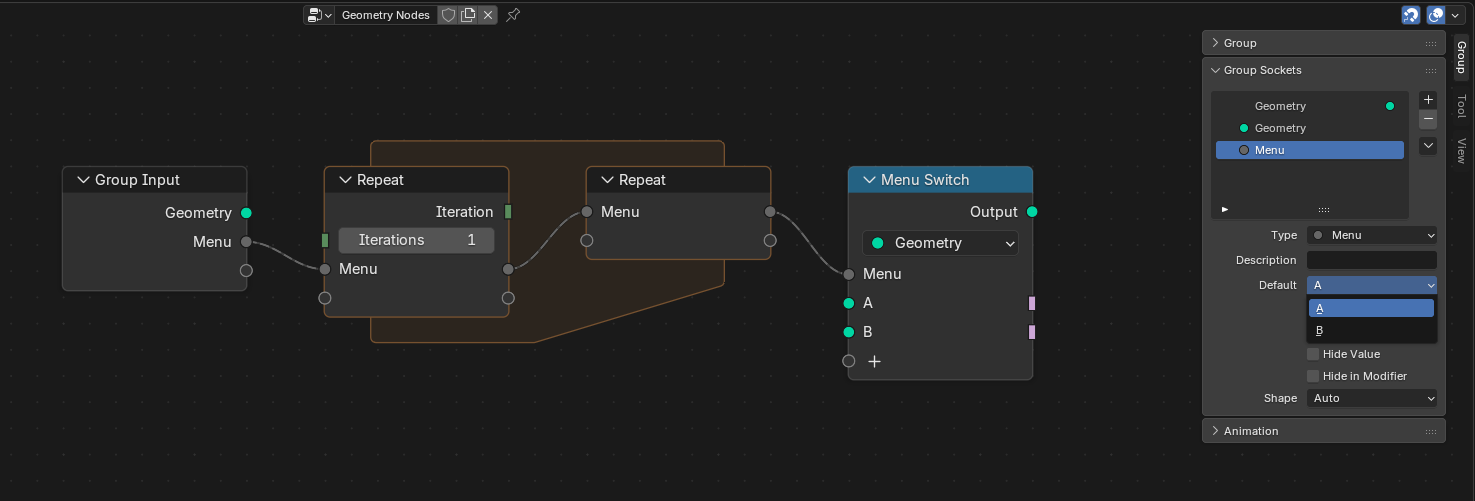 However, since the possible values of this default are defined by the “Menu Switch” node on the right, we lose the ability to define a default if the connection is broken:
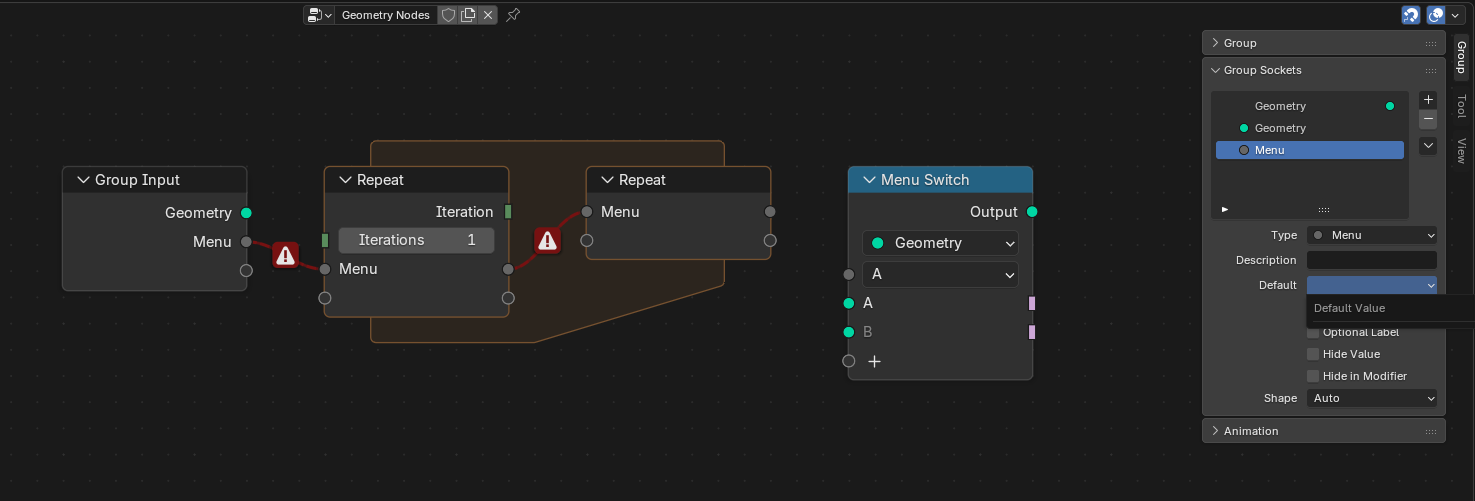
That means, to faithfully recreate the former setup with the default defined, Tree Clipper needs to order the import as follows:
- Import the interface so that the sockets appear on the “Group Input”.
- Import all the nodes, including their properties, so that the right side of the “Repeat” zone has a “Menu” entry and the “Menu Switch” has the enum variants. The sockets are implicitly created.
- Pair the two ends of “Repeat”. Then the left side also gets the “Menu” socket.
- Import all the links between the sockets.
- Finally, set the default value for the “Menu” in the tree interface.
Rest assured, there are more tricky-icky things, like the ordering of interface items and multi-links, that need some special attention. But we’ll leave it at this example.
Testing
After implementing Tree Clipper, I’d personally have no trust in a solution that doesn’t have automatic tests. We have 🌟extensive🌟 tests for Tree Clipper. There were so. many. bugs.
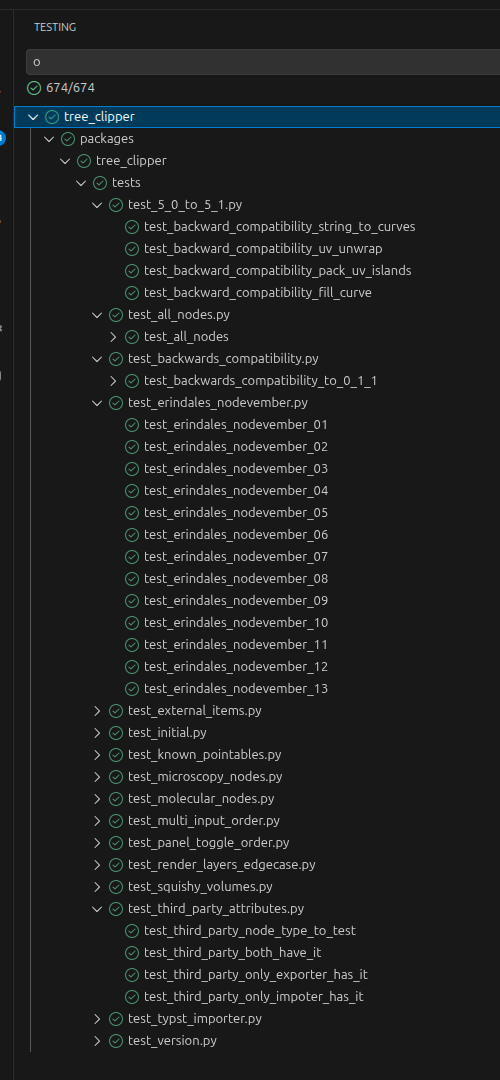
We have generated tests, round-trip tests for really complex setups from community .blend files, and tests for specific bugs we’ve found and fixed.
Of course, that doesn’t mean that there aren’t any bugs. In fact, I’d put some big money on bugs! Bugs are always a good bet.
Future Work
Tree Clipper is just starting to get some traction in the Blender community. I hope this section will quickly go out of date :)
Compositor Nodes
Importing compositor nodes is less fun than it should be.
Have a look at the Render Layer Node; this part fuels my nightmares:
Additional outputs for any enabled render passes.
That means that the render passes of the scene, which is an external item, define the sockets of that node. Ugh.
So the importer needs to have a scene where the render passes match those the exporter used.
Currently, Tree Clipper exports that information and complains if the provided scene’s render passes don’t match, but it’s really annoying to fix it. Maybe Tree Clipper can adjust the scene to fit. That could be an unexpected change to the user of the import, though.
It may be acceptable if there were a pop-up warning 🤔
Import Performance
The other issue is that large node trees can take a long time to import.
Regrettably, this is not something that will go away quickly. It is a broader performance issue in how Blender verifies nodes added via Python. The more nodes there are in a group, the longer verification takes, so the runtime is quadratic in the number of nodes in a given group.
The workaround is to divvy up the nodes into more groups before exporting.
Key-Framed Values
This is a blind spot Tree Clipper still has >.<
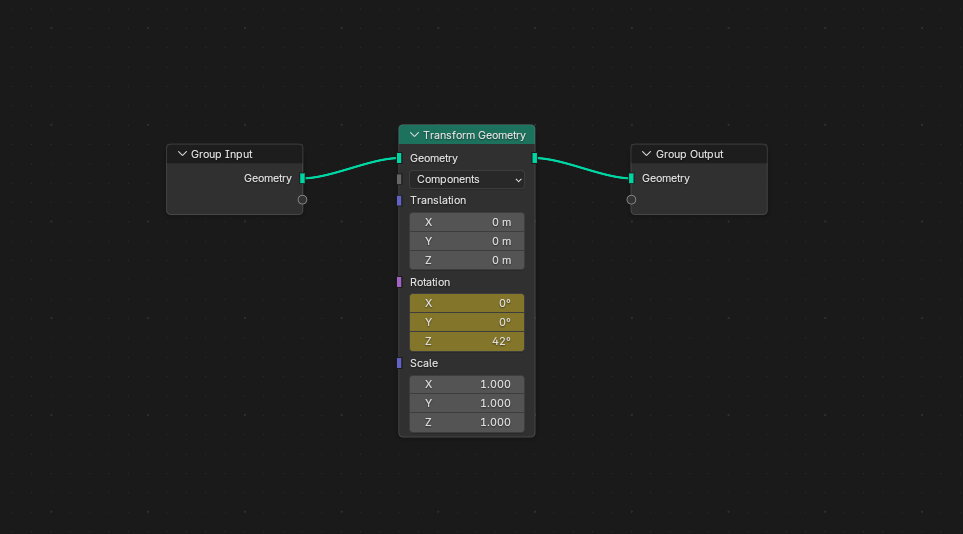 The Rotation socket in this Transform Geometry node is animated, but Tree Clipper will export whatever its current value is.
Conclusion
Developing Tree Clipper was more fun than it had any right to be. I’ve personally learned a lot about Python. Even though I do love Rust for its static typing and logic, it was refreshing to have almost none of that.
Tree Clipper is going to power the generation of Squishy Volumes’ node setups in the next release. And so far it’s going really great!
I hope that Tree Clipper can be useful to you as well <3