Desert Space Ship Scene

Squishy Volumes is a Blender add-on developed by Algebraic that puts the Material Point Method (MPM) directly into Blender. Get the latest release!
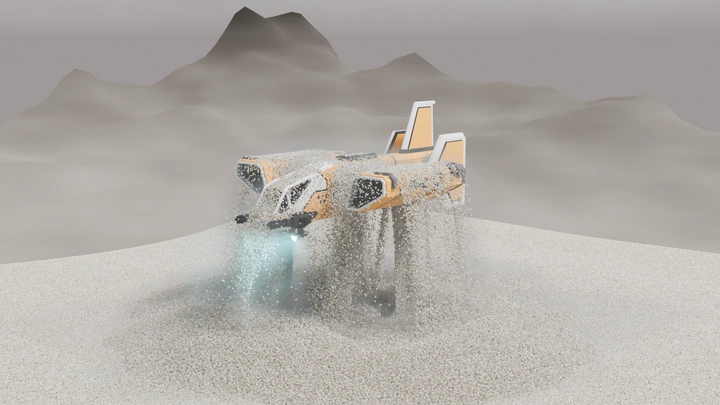
This blog post is about the making of a scene that shows a space ship emerging from the desert. The purpose is to test and showcase Squishy Volumes’ capabilities in scenes with millions of particles.
| Blender version: | 5.0.1 |
| Squishy Volumes version: | 0.2.0-alpha4 |
| Number of particles: | 6.070.868 |
| Number of grid nodes (varies over time): | ~1.500.000 |
| Simulated frames: | 250 |
| Directory size: | 786 GB 💀 |
| Bake time: | 18.75 hrs |
| Render time: | 14.29 hrs |
| Mode: | Explicit, CPU [1] |
We’re going to look at this example of what we can do with Squishy Volumes and what challenges to look out for. This blog post is not a step-by-step tutorial, though.
The general idea of the scene is to showcase the awesome power of this space ship. Sand is really heavy, so if the space ship is able to emerge from the depths of the desert and lift tons of material, yeah, that makes it all the more menacing. Here’s the link to this super cool Sci-Fi Ship LowPoly 3D model. [2]
We’ll need lots and lots of sand particles, some static flooring, and an animated collider for the simulation input. For the output, we can make some slight modifications to the Squishy Volumes default visualization and of course, the background, etc.
We’ll face some challenges in defining simulation input, baking, and simulation output. Then we’ll discuss visualization tricks and conclude the blog post with a few comments on how the add-on can be improved.
So, what are the challenges?
Challenges
Some parts are relatively easy; we won’t go into too much detail there. For example, setting up the sand.
Other parts are harder. We’ll need to deal with non-manifold edges, inconsistent collider grids, exploding sand, and, last but not least, efficiently working with the outputs.
Let’s start with the input.
Simulation Input
We’ll have a particle input for the sand and three collider inputs: one for the floor and two for the space ship. The model’s guns are provided as a separate object, and it’s more convenient to use them as a second animated collider.

Sand
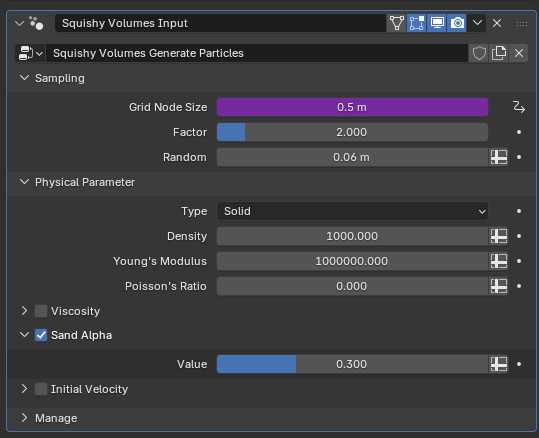
The sand was relatively easy to get “right”. The sand is spawned in this simple square “bowl” with the Squishy Volumes default generating nodes.

It’s worth having the sand “soft”, since we pay for stiff material with a higher simulation runtime.
Here, it’s 1 MPa Young's Modulus.
Realistic values are at least 10 times that, but it has to be just hard enough to be visually convincing.
Space Ship
The space ship colliders were a bit tricky. But thanks to Blender operations and modifiers we can work around the non-manifold edges and use Squishy Volumes Collider Grid output to debug inconsistencies.
Non-Manifold Edges
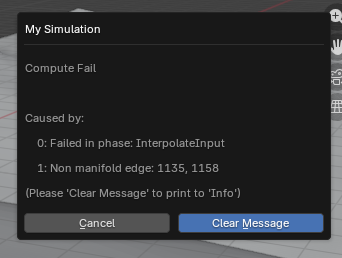
The model does have a bunch of non-manifold edges. That is not a problem for rendering and many mesh operations, but it becomes problematic for determining whether a point is inside or outside a mesh. Squishy Volumes needs to do just that and throws this error:
To inspect the mesh, we can use this select non-manifold operation:
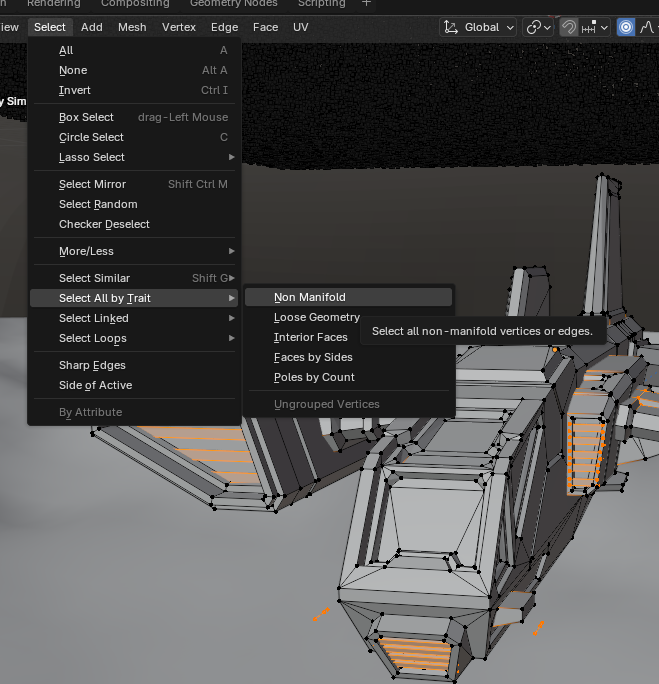
In this case, it’s possible to leverage Blender’s Remesh Modifier to get manifold geometry.
This is with a Voxel Size of 0.05 m:
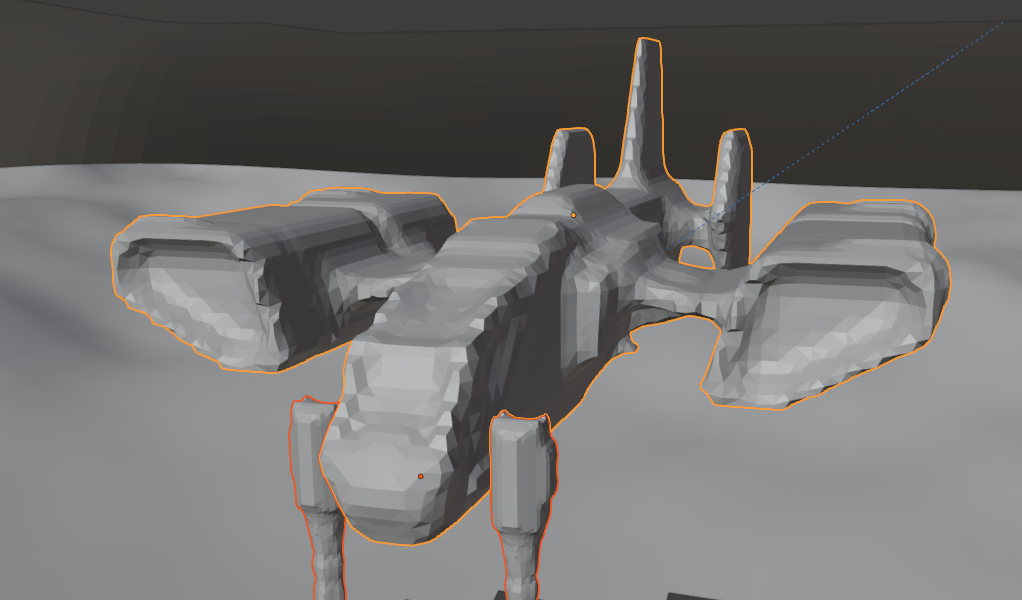
One might be tempted to use some adaptive remeshing, alas…
Inconsistent Collider Grid
If the collider mesh is “weird” enough, the grid embedding may become inconsistent. This can cause all kinds of wrong behavior.
In this case, I thought it would be a good idea to do some adaptive remeshing, but that caused some hefty squishing, and Squishy Volumes dialed down the adaptive timestep all the way to zero, which results in this error:

It’s not obvious at all what’s causing this, but if we add the collider grid as an output like this:
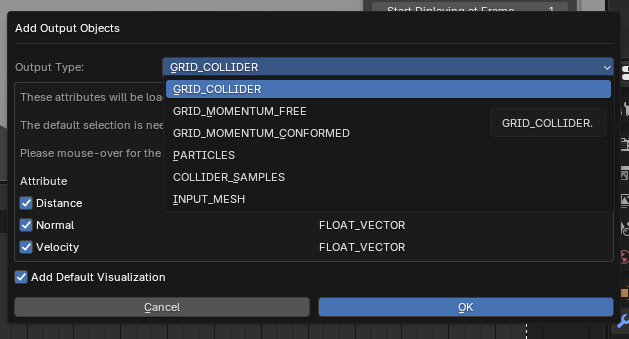
We can inspect the values visually and spot some issues at the tip of the vertical stabilizer:
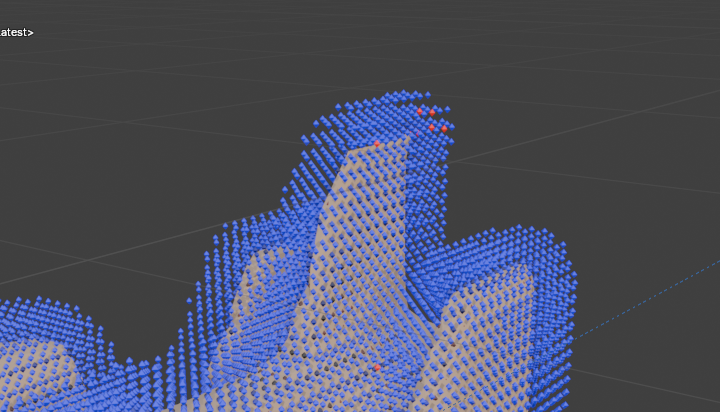
>.<
It is always a good idea to verify that the distance has a consistent sign (indicated by color).
Removing the adaptivity of the remesh modifier resolved the issue. The next challenge comes up during baking.
Baking
Squishy Volumes bakes the simulation by advancing in time step-by-step. We want the largest possible time steps for performance.
There’s a maximum value Time Step that we can specify, and with Adpative Time Steps enabled, Squishy Volumes will use a heuristic to determine a (smaller) safe value.
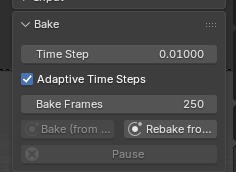
In this scene, the heuristic failed. A few frames into the bake, the sand explodes as the space ship pushes through it.
As a workaround, we can limit the timestep to 0.0005 s, keeping everything stable from start to finish.
It now remains to work with the output.
Simulation Output
During baking, we need a fast way to monitor progress. And once the simulation is finished, we want to be able to play it back quickly.
Visualize as Points
While baking, it’s a good idea to check the output every now and then.
The default visualization modifier from Squishy Volumes lacks this, and its Deformed Cubes visualization can brick Blender.
But a simple setup like this does the trick:
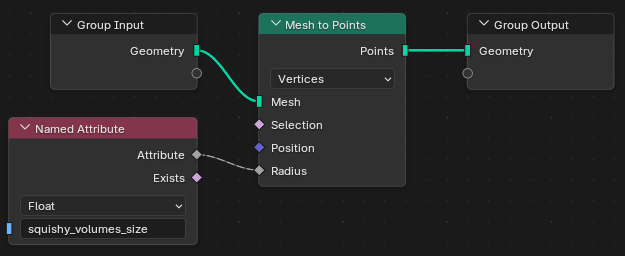
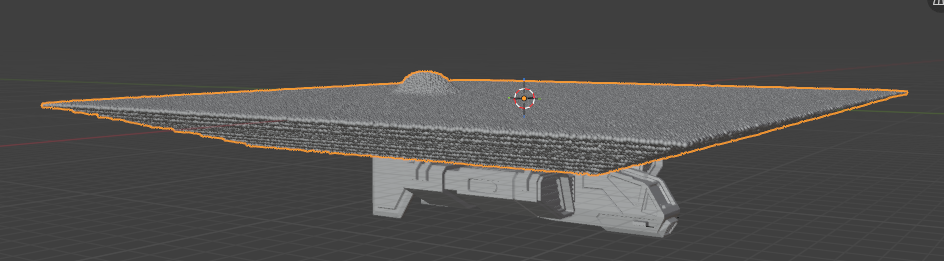
Even with millions of particles, the viewport stays responsive, and we can see whether our sand has exploded yet.
Once the simulation is finished, we can speed things up further.
Bake to Bake
The data transfer from Squishy Volumes to Blender doesn’t change after the simulation finishes. For a given frame, Squishy Volumes needs to read the simulation results from disk, perform some data wrangling, and hand them over to Blender via the “Rust->Python->C++” bridge.
That tends to be slow, and in this scene, it took seconds per frame. To add to the issue, the synchronization is driven by a frame-change handler that “magically” overwrites the geometry on the output object.
By utilizing Blender’s native bakes, we can alleviate these issues. We do add a manual step, though.
We can put this as the first modifier on the output:
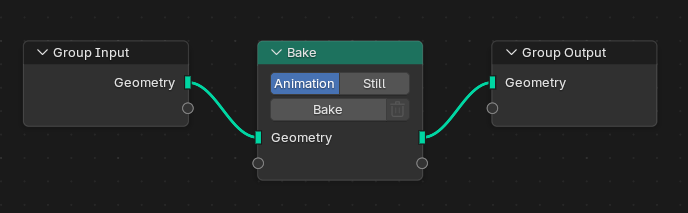
And then bake the Squishy Volumes bake into a Blender bake. This still needs to step through the frames and fetch the data in the same way as before, but it’s not being displayed while baking, and afterwards, it plays back fast.
We can now disable Sync on our simulation, which skips that whole data business:

And in fact, we could disable Squishy Volumes completely now and get rid of the huge cache directory.
There are two things to keep in mind with this workflow.
- We need to rebake the bake-to-bake each time we re-simulate
- The
Bake Targetshould beDisk, otherwise saving (and autosaving!) is slow.
But with this workflow, it can be quite satisfying to look at the animated result and inspect it from all angles, and it’s a real enabler for the creative work that follows.
Visualization
We’re done with challenges; in this part, we just talk about visualization tricks.
The sand is displayed as deformed cubes from the default visualization, but with a different material that has some sand colors and subsurface scattering.
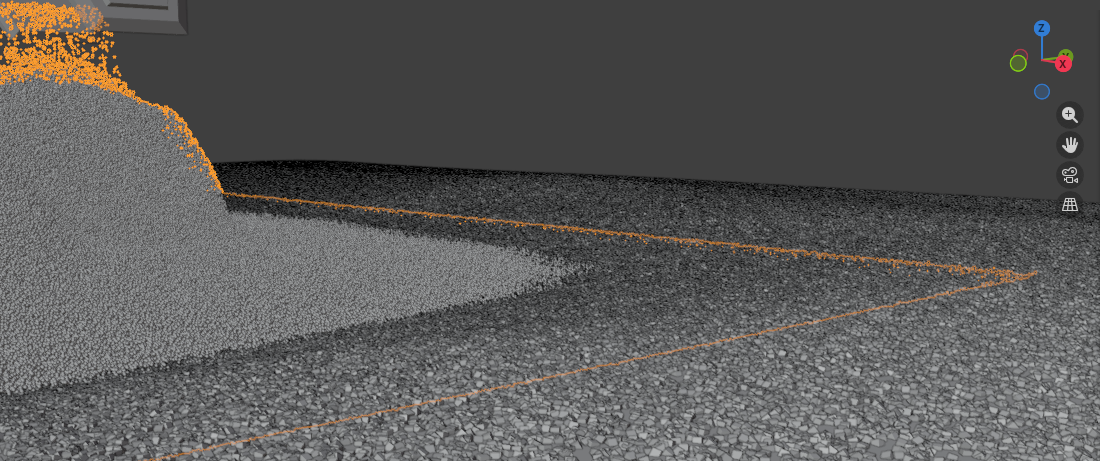
Fake Floor
To smooth out the boundary between the actually simulated material and the static floor, we can add another “fake” surface. That surface has some purely geometric cubes scattered on it with the same look as our simulated ones.
Dust Volume
Another trick worth noting here is to use a second particle output for the “dust”. For this second output, we use the basic surface reconstruction with scaled-up radii and convert it to a low-density volume. This way, it looks like the kicked-up sand produces dust and the spotlight’s cone becomes a bit visible.
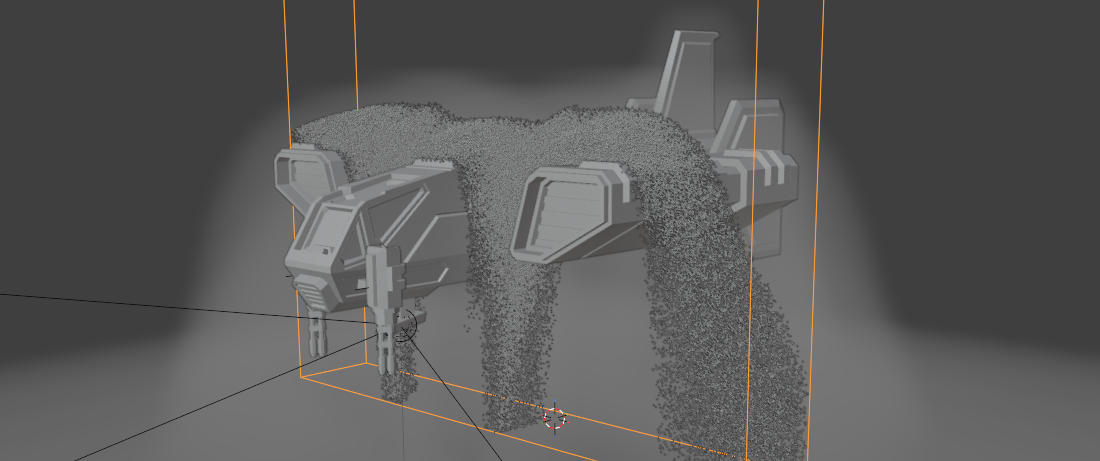
Bonus trick: The Squishy Volumes Restrict View object operation allows you to view a selected region of material, which is very useful.
Then there are other topics, like the background and world shader, that we could discuss, but they are not directly related to Squishy Volumes and are much better covered elsewhere.
Conclusion
Here we go over the challenges again and discuss how Squishy Volumes could make them less challenging.
The error handling of the non-manifold issue might be good enough as it is. Blender provides tools to find and fix this issue, and it seems hard to fix automatically.
The inconsistency of the collider grid is something we can hopefully improve! It would be helpful to have some sort of automatic sanity check at the very least. This specific issue might also be a bug and shouldn’t have happened in the first place.
Unintended explosions are annoying, especially because they tend to occur some time into the bake. And the workaround of manually setting a low maximum can hurt performance. I suspect that the time-step heuristic needs to be changed. Needs more investigation.
Adding the cheap point visualization to the default modifier is a no-brainer.
The workflow utilizing Blender’s bakes is very exciting! Maybe Squishy Volumes can offer more tooling around it to reduce the number of manual steps. And maybe the data transfer could also be improved a bit; it still takes some time for the bake to record all the frames.
And of course, there are many more ways in which Squishy Volumes can and will improve that we didn’t discuss. One important one is overall performance. It’s still punishing to restart a simulation to try any different input. (GPU support, pls)
Finally, I think the result looks not too shabby! It is really cool what Squishy Volumes enables us to do, despite the challenges. This scene sets the bar for future Squishy Volume projects.
Try creating a scene with Squishy Volumes and join our Discord!
We are happy to help you out. <3
[1] This is currently the only supported mode. In the future, there will also be GPU support and implicit integration.
[2] Usually, when I'm posting something, for example on Discord, I like to share the .blend file. In this case the license of the space ship model prohibits this.